多层神经网络
解决非线性问题
通过实验验证了单层神经网络的拟合功能。但是在实际环境中,发现这种拟合的效果极其有限。对于某些样本,即便是Maxout也无法解决问题。追究根本,源于样本本身的特性,即单层神经网络只能解决对线性可分的问题。
本章将介绍如何使用多层神经网络来解决非线性问题。
线性问题与非线性问题
“线性问题”与“非线性问题”是神经网络中的常用术语。为了能够更准确地解释它们,咱们先从一个例子入手。
用线性单分逻辑回归分析肿瘤是良性还是恶性的
假设某肿瘤医院想用神经网络对已有的病例数据进行分类,数据的样本特征包括病人的年龄和肿瘤的大小,对应的标签为该病例是良性肿瘤还是恶性肿瘤。
1.生成样本集
对于这个任务,大家可能迫不及待地想用我们所学的模型试试了吧。这里因为没有医院的病例数据,为了方便演示,先用Python生成一些模拟数据来代替样本,它应该是个二维的数组“病人的年纪,肿瘤的大小”
generate为生成模拟样本的函数,意思是按照指定的均值和方差生成固定数量的样本。
代码7-1 线性逻辑回归
import tensorflow as tf
import matplotlib.pyplot as plt
import numpy as np
from sklearn.utils import shuffle
def generate(sample_size, mean, cov, diff, regression):
num_classes = 2
samples_per_class = int(sample_size / 2)
X0 = np.random.multivariate_normal(mean, cov, samples_per_class)
Y0 = np.zeros(samples_per_class)
for ci, d in enumerate(diff):
X1 = np.random.multivariate_normal(mean + d, cov, samples_per_class)
Y1 = (ci + 1) * np.ones(samples_per_class)
X0 = np.concatenate((X0, X1))
Y0 = np.concatenate((Y0, Y1))
if regression == False: # one-hot编码,将0转成1 0
class_ind = [Y == class_number for class_number in range(num_classes)]
Y = np.asarray(np.hstack(class_ind), dtype=np.float32)
X, Y = shuffle(X0, Y0)
return X, Y
代码7-1 线性逻辑回归(续)
np.random.seed(10) # 保证每次运行代码时生成的随机值都一样
num_classes = 2 # 定义生成类的个数
mean = np.random.randn(num_classes)
cov = np.eye(num_classes)
X, Y = generate(1000, mean, cov, [3.0], True) # 3.0表明两类数据的x和y差距3.0
colors = ['r' if l == 0 else 'b' for l in Y[:]]
plt.scatter(X[:, 0], X[:, 1], c=colors)
plt.xlabel("Scaled age (in yrs)")
plt.ylabel("Tumor size (in cm)")
plt.show()
lab_dim = 1
上面代码是调用generate函数生成1000个数据,并将它们图示化。
- 定义随机数的种子值(这样可以保证每次运行代码时生成的随机值都一样)。
- 定义生成类的个数
num_classes=2。 3.0是表明两类数据的x和y差距3.0。传入的最后一个参数regression =True表明使用非one-hot的编码标签。
运行上面的代码,得到的结果如图7-1所示。
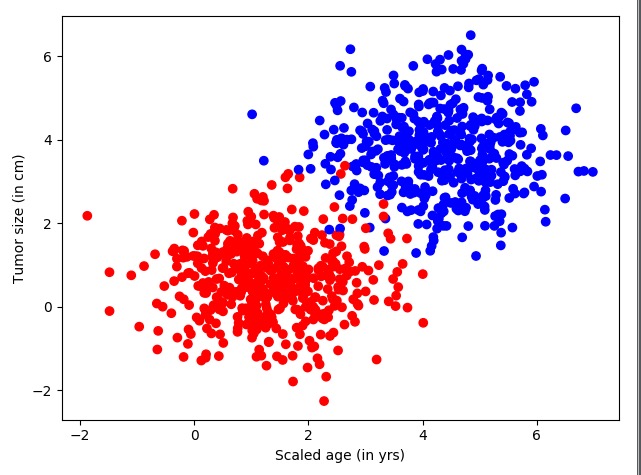
图中左下是红色的样本数据,右上是蓝色的样本数据。
2.构建网络结构
下面开始构建网络模型,见下方代码。使用前面刚刚学过的一个神经元,先定义输入、输出两个占位符,然后是w和b的权重。
代码7-1 线性逻辑回归(续)
## 构建网络结构
input_features = tf.placeholder(tf.float32, [None, input_dim])
input_labels = tf.placeholder(tf.float32, [None, lab_dim])
# 定义学习参数
W = tf.Variable(tf.random_normal([input_dim, lab_dim]), name="weight")
b = tf.Variable(tf.zeros([lab_dim]), name="bias")
output = tf.nn.sigmoid(tf.matmul(input_features, W) + b) # 激活函数
cross_entropy = -(input_labels * tf.log(output) + (1 - input_labels) * tf.log(1 - output)) # 损失函数
ser = tf.square(input_labels - output)
loss = tf.reduce_mean(cross_entropy)
err = tf.reduce_mean(ser)
optimizer = tf.train.AdamOptimizer(0.04)
# 尽量用这个,因其收敛快,会动态调节梯度
train = optimizer.minimize(loss) # 优化器
- 激活函数使用的是Sigmoid。
- 损失函数loss仍然使用交叉熵,里面又加了一个平方差函数,用来评估模型的错误率。
- 优化器使用AdamOptimizer。
3.设置参数进行训练
然后整个数据集迭代50次,每次的minibatchsize取25条。
代码7-1 线性逻辑回归(续)
maxEpochs = 50
minibatchSize = 25
# 启动session
with tf.Session() as sess:
sess.run(tf.global_variables_initializer())
for epoch in range(maxEpochs):
sumerr = 0
for i in range(np.int32(len(Y) / minibatchSize)):
x1 = X[i * minibatchSize:(i + 1) * minibatchSize, :]
y1 = np.reshape(Y[i * minibatchSize:(i + 1) * minibatchSize], [-1, 1])
tf.reshape(y1, [-1, 1])
_, lossval, outputval, errval = sess.run([train, loss, output, err],
feed_dict={input_features: x1, input_labels: y1})
sumerr = sumerr + errval
print("Epoch:", '%04d' % (epoch + 1), "cost=", "{:.9f}".format(lossval), "err=",
sumerr / np.int32(len(Y) / minibatchSize))
每一次的计算都会将err错误值累加起来,数据集迭代完一次会将err的错误率进行一次平均,平均值再输出来。运行上面的代码,生成如下信息:
Epoch: 0001 cost= 0.937670827 err= 0.857066742182
Epoch: 0002 cost= 0.576581895 err= 0.474182988405
Epoch: 0003 cost= 0.326138794 err= 0.273106197715
……
Epoch: 0048 cost= 0.028127037 err= 0.019222549072
Epoch: 0049 cost= 0.027764326 err= 0.0191760268845
Epoch: 0050 cost= 0.027415426 err= 0.0191324938528
经过50次的迭代,得到了错误率为0.019的模型。
4.数据可视化
为了直观地解释线性可分,下面将模型结果和样本以可视化的方式显示出来,前一部分是先取100个测试点,在图像上显示出来,接着将模型以一条直线的方式显示出来。
代码7-1 线性逻辑回归(续)
train_X, train_Y = generate(100, mean, cov, [3.0], True)
colors = ['r' if l == 0 else 'b' for l in train_Y[:]]
plt.scatter(train_X[:, 0], train_X[:, 1], c=colors)
x = np.linspace(-1, 8, 200)
y = -x * (sess.run(W)[0] / sess.run(W)[1]) - sess.run(b) / sess.run(W)[1]
plt.plot(x, y, label='Fitted line')
plt.legend()
plt.show()
如上代码,模型生成的z用公式可以表示为z=x1w1+x2*w2+b,如果将x1和x2映射到直角坐标系中的x和y坐标,那么z就可以被分为小于0和大于0两部分。当z=0时,就代表直线本身,令上面的公式中z等于零,就可以将模型转化成如下直线方程:
x2=-x1* w1/w2-b/w2,即:y=-x* (w1/w2)-(b/w2)
其中,w1、w2、b都是模型中的学习参数,带到公式中用plot显示出来。运行代码,生成结果如图所示。
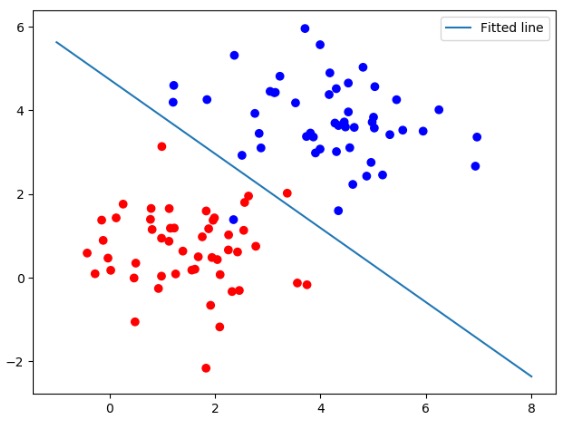
图7-2 线性逻辑回归
5.线性可分概念
如图7-2所示这种情况,可以用直线分割的方式解决问题,则可以说这个问题是线性可分的。同理,类似这样的数据集就可以被称为线性可分数据集合。凡是使用这种方法来解决的问题就叫做线性问题。
用线性逻辑回归处理多分类问题
还是接着前面的例子,这次在数据集中再添加一类样本,可以使用多条直线将数据分成多类。
构建网络模型完成将3类样本分开的任务。在实现过程中先生成3类样本模拟数据,构造神经网络,通过softmax分类的方法计算神经网络的输出值,并将其分开。
1.生成样本集
这里还使用上面代码中的generate函数,这次不同的是生成了2000个点、3类数据,并且使用one_hot编码。
代码7-2 线性多分类
import tensorflow as tf
import matplotlib.pyplot as plt
importrflow asimport tensorflow as tf
import matplotlib.pyplot as plt
import numpyimport tensorflow as tf
import matplotlib.pyplot as plt
import numpy asort tensorflowimport tensorflow as tf
import matplotlib.pyplot as plt
import numpy as np
from sklearnensorflow asimport tensorflow as tf
import matplotlib.pyplot as plt
import numpy as np
fromimportrflow as tf
import matplotlib.pyplot as plt
import numpy as np
from sklearn.utils import shuffle
# 对于上面的fit可以这么扩展变成动态的
from sklearn.preprocessing import OneHotEncoder
def onehotort tensorflowimport tensorflow as tf
import matplotlib.pyplot as plt
import numpy as np
fromensorflow as tf
import matplotlib.pyplot as plt
import numpy as np
from sklearn.utils import shuffleimportflow asimport tensorflow as tf
import matplotlib.pyplot as plt
import numpy asimport tensorflow as tf
import matplotlib.pyplot as plt
import numpy asort tensorflowimport tensorflow as tf
import matplotlib.pyplot as plt
import numpy asimport tensorflow as tf
import matplotlib.pyplot as plt
import numpy as np
from sklearn.utilsimportrflow as tf
import matplotlib.pyplot as plt
import numpy as np
from sklearn.utils import shuffle
# 对于上面的fit可以这么扩展变成动态的
from sklearn.preprocessing import OneHotEncoder
def onehot(yort tensorflowimport tensorflow as tf
import matplotlib.pyplot as plt
import numpy as np
fromimport tensorflow as tf
import matplotlib.pyplot as plt
import numpy as np
from sklearn asimport tensorflow as tf
import matplotlib.pyplot as plt
import numpy asimport tensorflow as tf
import matplotlib.pyplot as plt
import numpy as np
fromort tensorflowimport tensorflow as tf
import matplotlib.pyplot as plt
import numpy as np
fromimport tensorflow asimport tensorflow as tf
import matplotlib.pyplot as plt
import numpy as np
fromimport tensorflowimport tensorflow as tf
import matplotlib.pyplot as plt
import numpy as npimport tensorflow as tf
import matplotlib.pyplot as plt
import numpy asort tensorflowimport tensorflow as tf
import matplotlib.pyplot as plt
import numpy as npimport tensorflow as tf
import matplotlib.pyplot as plt
import numpy as np
from sklearn.utils importw asimport tensorflow as tf
import matplotlib.pyplot as plt
import numpyimport tensorflow as tf
import matplotlib.pyplot as plt
import numpyimport tensorflow as tf
import matplotlib.pyplot as plt
import numpy as np
fromensorflow asimport tensorflow as tf
import matplotlib.pyplot as plt
import numpy as npimportlow asimport tensorflow as tf
import matplotlib.pyplot as plt
importimport tensorflow as tf
import matplotlib.pyplot as plt
import numpy asort tensorflowimport tensorflow as tf
import matplotlib.pyplot as plt
import numpy asensorflow asimport tensorflow as tf
import matplotlib.pyplot as plt
import numpy as np
fromow asimport tensorflow as tf
import matplotlib.pyplot as plt
import numpyimport tensorflow as tf
import matplotlib.pyplot as plt
import numpyimport tensorflowimport tensorflow as tf
import matplotlib.pyplot as plt
import numpy as npimport tensorflow as tf
import matplotlib.pyplot as plt
import numpy as np
fromow asimport tensorflow as tf
import matplotlib.pyplot as plt
importimport tensorflow as tf
import matplotlib.pyplot as plt
import numpy asort tensorflowimport tensorflow as tf
import matplotlib.pyplot as plt
import numpy as np
from sklearnensorflow as tf
import matplotlib.pyplot as plt
import numpy as np
from sklearn.utils importimport tensorflowimport tensorflow as tf
import matplotlib.pyplot as plt
import numpy asimport tensorflow as tf
import matplotlib.pyplot as plt
import numpyort tensorflowimport tensorflow as tf
import matplotlib.pyplot as plt
import numpy as npensorflow asimport tensorflow as tf
import matplotlib.pyplot as plt
import numpy as np
from sklearnimport asimport tensorflow as tf
import matplotlib.pyplot as plt
import numpyimport tensorflow as tf
import matplotlib.pyplot as plt
import numpy as npimport tensorflow as tf
import matplotlib.pyplot as plt
import numpy as npensorflow asimport tensorflow as tf
import matplotlib.pyplot as plt
import numpy as np
from sklearn.utilsimport
importimport tensorflow as tf
import matplotlib.pyplot as plt
import numpy asimport tensorflow as tf
import matplotlib.pyplot as plt
import numpy as nport tensorflowimport tensorflow as tf
import matplotlib.pyplot as plt
import numpy as npensorflow asimport tensorflow as tf
import matplotlib.pyplot as plt
import numpy as np
from sklearn.utilsimport tensorflowimport tensorflow as tf
import matplotlib.pyplot as plt
import numpy as np
fromimport tensorflow as tf
import matplotlib.pyplot as plt
import numpy as np
fromort tensorflow as tf
import matplotlib.pyplot as plt
import numpy as np
from sklearn.utils import shuffleensorflow asimport tensorflow as tf
import matplotlib.pyplot as plt
import numpy as np
from sklearn.utils importasimport tensorflow as tf
import matplotlib.pyplot as plt
import numpy as npimport tensorflow as tf
import matplotlib.pyplot as plt
import numpy asort tensorflowimport tensorflow as tf
import matplotlib.pyplot as plt
import numpy as np
from sklearn.utils import shuffle
# 对于上面的fit可以这么扩展变成动态的
from sklearn.preprocessing import OneHotEncoder
def onehot(y, start, end):
ohe = OneHotEncoder()
a = npimport tensorflow as tf
import matplotlib.pyplot as plt
import numpy as np
fromnsorflow asimport tensorflow as tf
import matplotlib.pyplot as plt
import numpyimport tensorflow as tf
import matplotlib.pyplot as plt
import numpy asimport tensorflowimport tensorflow as tf
import matplotlib.pyplot as plt
import numpy as npensorflow asimport tensorflow as tf
import matplotlib.pyplot as plt
import numpy as np
from sklearn.utilsimport tensorflowimport tensorflow as tf
import matplotlib.pyplot as plt
import numpyimport tensorflow as tf
import matplotlib.pyplot as plt
import numpy as np
from sklearn.utils import shuffle
# 对于上面的fit可以这么扩展变成动态的
from sklearn.preprocessing import OneHotEncoder
def onehot(y, start, end):
ohe = OneHotEncoderimportasimport tensorflow as tf
import matplotlib.pyplot as plt
import numpy asimport tensorflow as tf
import matplotlib.pyplot as plt
import numpy asort tensorflowimport tensorflow as tf
import matplotlib.pyplot as plt
import numpy as np
fromimportensorflow asimport tensorflow as tf
import matplotlib.pyplotow asimport tensorflow as tf
import matplotlib.pyplot as plt
import numpy as np
fromimport tensorflow as tf
import matplotlib.pyplot as plt
import numpy as np
from sklearnort tensorflowimport tensorflow as tf
import matplotlib.pyplot as plt
import numpy as np
from sklearn.utils import shuffle
# 对于上面的fit可以这么扩展变成动态的
from sklearn.preprocessing import OneHotEncoderimport tensorflowimport tensorflow as tf
import matplotlib.pyplot as plt
import numpy as npimport tensorflow as tf
import matplotlib.pyplot as plt
import numpy as nport tensorflow asimport tensorflow asensorflow as tf
import matplotlib.pyplot as plt
import numpy as np
from sklearn.utils import shuffle
# 对于上面的fit可以这么扩展变成动态的
fromflow asimport tensorflow as tf
import matplotlib.pyplot as plt
import numpy as npimport tensorflow as tf
import matplotlib.pyplot as plt
import numpy as nport tensorflowimport tensorflow as tf
import matplotlib.pyplot as plt
import numpy asensorflow asimport tensorflow as tf
import matplotlib.pyplot as plt
importimport tensorflow as tf
import matplotlib.pyplot as plt
import numpy asimport tensorflow as tf
import matplotlib.pyplot as plt
import numpy as nport tensorflowimport tensorflow as tf
import matplotlib.pyplot as plt
import numpy as np
from sklearn.utils importimportimport tensorflow as tfimport tensorflow as tf
import matplotlib.pyplot as plt
import numpy as np
from sklearn.utils import shuffle
# 对于上面的fit可以这么扩展变成动态的
from sklearn.preprocessing import OneHotEncoder
def onehot(y, start, end):
oheort tensorflowimport tensorflow as tf
import matplotlib.pyplot as pltimport tensorflow as tf
import matplotlib.pyplot as plt
import numpy as np
from sklearn.utils import shuffle
# 对于上面的fit可以这么扩展变成动态的
from sklearn.preprocessing import OneHotEncoderimportf
importimport tensorflow as tf
import matplotlib.pyplot as plt
import numpy as npimport tensorflow as tf
import matplotlibimport tensorflow as tf
import matplotlib.pyplot as plt
import numpy as np
from sklearn.utils import shuffle
# 对于上面的fit可以这么扩展变成动态的
from sklearnimport tensorflowimport tensorflow as tf
import matplotlib.pyplot as plt
import numpy as np
from sklearn.utils importimportasimport tensorflow as tf
import matplotlib.pyplot asimport tensorflow as tf
import matplotlib.pyplot as plt
import numpy asort tensorflowimport tensorflow as tf
import matplotlib.pyplot as plt
import numpy as npimportimport tensorflow as tf
import matplotlib.pyplot as plt
import numpy as np
from sklearn.utilsimport tensorflowimport tensorflow as tf
import matplotlib.pyplot as plt
import numpy as np
from sklearn.utils import shuffle
# 对于上面的fit可以这么扩展变成动态的
from sklearn.preprocessing import OneHotEncoder
def onehot(y, start, endort tensorflow as tf
import matplotlib.pyplot as plt
import numpy as np
from sklearn.utils importimport tensorflow as tf
import matplotlib.pyplot as plt
import numpy as np
from sklearn.utils import shuffle
# 对于上面的fit可以这么扩展变成动态的
from sklearnimport tensorflowimport tensorflow as tf
import matplotlib.pyplot as plt
import numpy as npimport tensorflow as tf
import matplotlib.pyplot as plt
import numpy as nport tensorflowimport tensorflow as tf
import matplotlib.pyplot as plt
import numpy as np
from sklearnimport tensorflow as tf
import matplotlib.pyplot as plt
import numpy as np
from sklearn.utils import shuffle
# 对于上面的fit可以这么扩展变成动态的
fromimportimport tensorflow as tf
import matplotlib.pyplot as plt
import numpy asimport tensorflow as tf
import matplotlib.pyplot as plt
import numpyort tensorflowimport tensorflow as tf
import matplotlib.pyplot as plt
import numpy asensorflow asimport tensorflow as tf
import matplotlib.pyplot as plt
import numpy as np
from sklearn.utils importimport tensorflowimport tensorflow as tf
import matplotlib.pyplot as plt
import numpy asimport tensorflow as tf
import matplotlib.pyplot as plt
import numpy as nport tensorflowimport tensorflow as tf
import matplotlib.pyplot as plt
import numpy as npensorflow as tf
import matplotlib.pyplot as plt
import numpy as np
from sklearn.utils import shuffle
# 对于上面的fit可以这么扩展变成动态的
from sklearnimportimport tensorflow as tf
import matplotlib.pyplot as plt
import numpy as np
from sklearn.utils import shuffle
# 对于上面的fit可以这么扩展变成动态的
fromimport tensorflow asimport tensorflow as tf
import matplotlib.pyplot as plt
import numpy as np
from sklearn.utils import shuffle
# 对于上面的fit可以这么扩展变成动态的
from sklearn.preprocessing import OneHotEncoder
def onehotimport tensorflowimport tensorflow as tf
import matplotlib.pyplot as plt
importimport tensorflow as tf
import matplotlib.pyplot as plt
import numpyow asimport tensorflow as tf
import matplotlib.pyplotimport tensorflow as tf
import matplotlib.pyplot as pltort tensorflowimport tensorflow as tf
import matplotlib.pyplot as plt
import numpy as np
from sklearn.utils import shuffleensorflow asimport tensorflow as tf
import matplotlib.pyplot as plt
import numpy as np
fromimport tensorflowimport tensorflow as tf
import matplotlib.pyplot as pltimport tensorflow as tf
import matplotlib.pyplot asort tensorflow as tf
import matplotlib.pyplot as plt
import numpyensorflow as tf
import matplotlib.pyplot as plt
import numpy as np
from sklearnimport tensorflow as tf
import matplotlib.pyplot as plt
import numpy as np
from sklearn.utils import shuffleimport tensorflow as tf
import matplotlib.pyplot as plt
import numpyimport tensorflow as tf
import matplotlib.pyplot as plt
import numpy as np
from sklearn.utilsimport tensorflow matplotlib.pyplot as plt
import numpy as np
fromimport tensorflow as tf
import matplotlib.pyplot as plt
importensorflow asimport tensorflow as tf
import matplotlib.pyplot as plt
import numpy as npt matplotlib.pyplot as plt
import numpy as np
from sklearn.utils import shuffle
# 对于上面的fit可以这么扩展变成动态的
from sklearn.preprocessing import OneHotEncoder
defimport tensorflow as tf
import matplotlib.pyplot as plt
importow as tf
import matplotlib.pyplot as plt
import numpy as np
from sklearn.utils import shuffle
# 对于上面的fit可以这么扩展变成动态的
fromimportimport tensorflow as tf
import matplotlib.pyplot as pltimport tensorflow as tf
import matplotlib.pyplot asimport tensorflow as tf
import matplotlib.pyplot as plt
import numpy as np
from sklearn.utils import shuffle
# 对于上面的fit可以这么扩展变成动态的
from sklearn.preprocessing import OneHotEncoder
def onehot(y, start, end tensorflowimportlib.pyplotmport numpy astils importimport tensorflow as tf
import matplotlib.pyplot asimportimport tensorflow as tf
import matplotlib.pyplot as plt
importnsorflow as tf
import matplotlib.pyplot as plt
import numpy as np
from sklearn.utilsimportow asimport tensorflow as tf
import matplotlib.pyplot as pltimport tensorflow as tf
import matplotlib.pyplot as plt
import numpy as np
from sklearn.utils import shuffle
# 对于上面的fit可以这么扩展变成动态的
from sklearn.preprocessing import OneHotEncoder
def onehot(y, start, end):
ohe tensorflow
importtlib.pyplotrom sklearnort shuffleimport tensorflow as tf
import matplotlib.pyplot as pltrt tensorflow as tf
import matplotlib.pyplot as plt
import numpynsorflow as tf
import matplotlib.pyplot as plt
import numpy asnsorflow asimportimport tensorflow as tf
import matplotlib.pyplot as pltimport tensorflow as tf
import matplotlib.pyplot asimport tensorflow as tf
import matplotlib.pyplot as plt
import numpy as np
from sklearn.utils import shuffle
# 对于上面的fit可以这么扩展变成动态的
from sklearn.preprocessing import OneHotEncoder
def onehot(y, start, end tensorflow aslib.pyplotmport numpytils importimport tensorflow as tf
import matplotlib.pyplotrt tensorflow as tf
import matplotlib.pyplot as plt
import numpynsorflow as tf
import matplotlib.pyplot as plt
import numpy as np
from sklearn.utils import shuffle
# 对于上面的fit可以这么扩展变成动态的
from sklearn.preprocessingimport tensorflow as tf
import matplotlib.pyplot asimport tensorflow as tf
import matplotlib.pyplot as plt
import numpy as np
from sklearn.utils import shuffle
# 对于上面的fit可以这么扩展变成动态的
from sklearn.preprocessing import OneHotEncoder
def onehot(y, start, end):
ohe = OneHotEncoder()
aimport tensorflow asimportlib.pyplotmport numpyom sklearnrt shuffleimport tensorflow as tf
import matplotlib.pyplot as pltrt tensorflow as tf
import matplotlib.pyplot as plt
import numpynsorflow asimport tensorflow as tf
import matplotlib.pyplot as plt
import numpy as np
from sklearn.utils import shuffle
# 对于上面的fit可以这么扩展变成动态的
from sklearnimport tensorflow as tf
import matplotlib.pyplot asimport tensorflow as tf
import matplotlib.pyplot as plt
import numpy as np
from sklearn.utils import shuffleimport tensorflow as tf
import matplotlib.pyplot as plt
import numpy as np tfimport tensorflow as tf
import matplotlib.pyplot as plt
import numpy as npsorflow as tfimport tensorflow as tf
import matplotlib.pyplot asimport tensorflow as tf
import matplotlib.pyplot as plt
import numpy asimport tensorflow as tf
import matplotlib.pyplot as plt
importport tensorflow as tf
import matplotlib.pyplot as plt
import numpy as npmport tensorflow as tf
import matplotlib.pyplot as plt
import numpy as np
from sklearn.utils import shuffle
# 对于上面的fit可以这么扩展变成动态的
from sklearn.preprocessing import OneHotEncoder
def onehot(y, start, end):
ohe = OneHotEncoder()
a = np.linspace(start, end - 1, end - start)
b = np.reshape(a, [-1, 1]).astype(np.int32)
ohe.fit(b)
c = ohe.transform(y]).astype(np.int32)
ohe.fit(b)
c = ohe.transform]).astype(np.int32)
ohe.fit(b)
c = ohe.transform]).astype(np.int32)
ohe.fit(b)
c = ohe.transform(y).toarray()
return c
# 模拟数据点
def generate(sample_size, num_classes]).astype(np.int32)
ohe.fit(b)
c = ohe.transform]).astype(np.int32)
ohe.fit(b)
c = ohe.transform]).astype(np.int32)
ohe.fit(b)
c = ohe.transform(y).toarray()
return c
# 模拟数据点
def generate(sample_size, num_classes]).astype(np.int32)
ohe.fit(b)
c = ohe.transform(y]).astype(np.int32)
ohe.fit(b)
c = ohe.transform]).astype(np.int32)
ohe.fit(b)
c = ohe.transform(y).toarray()
return c
# 模拟数据点
def generate(sample_size, num_classes]).astype(np.int32)
ohe.fit(b)
c = ohe.transform]).astype(np.int32)
ohe.fit(b)
c = ohe.transform(y).toarray()
return c
# 模拟数据点
defe(np.int32)
ohe.fit(b)
c = ohe.transform(y).toarray()
return]).astype(np.int32)
ohe.fit(b)
c = ohe.transform]).astype(np.int32)
ohe.fit(b)
c = ohe.transform]).astype(np.int32)
ohe.fit(b)
c = ohe.transform(y).toarraystype(np]).astype(np.int32)
ohe.fit(b)
c = ohe.transform(y).toarray()
returntype(np]).astype(np.int32)
ohe.fit(b)
c = ohe.transform(y]).astype(np.int32)
ohe.fit(b)
c = ohe.transform(y).toarray]).astype(np.int32)
ohe.fit(b)
c = ohe.transform(y).toarray()
return c
# 模拟数据点
def generate(sample_size, num_classes, diff, regression=False):
np.random.seed(10)
mean = np.random.randn(2)
cov = np.eye)
cov = np.eye(2)
# len(diff)
samples_per_class
# len)
# len(diff)
samples_per_class = int(sample_size / num_classes)
X0 = np
# len)
# len(diff)
samples_per_class = int(sample_size / num_classes)
X0 = np.random.multivariate_normal(mean, cov, samples_per_class)
Y0 # lenles_per_class = int)
# len(diff)
samples_per_class = int(sample_size / num_classes)
X0 = np.random # len(diff)
samples_per_class = int(sample_size / num_classes)
X0 = np.random.multivariate_normal)
# len)
# len(diff)
samples_per_class = int(sample_size / num_classes)
X0 = np.random)
# len(diff)
samples_per_class = int(sample_size / num_classes)
X0 = np.random)
# len)
# len(diff)
samples_per_class = int(sample_size / num_classes)
X0 = np.random.multivariate_normal(mean, cov, samples_per_class)
Y0 = np.zeros(samples_per_class)
for ci, d in enumerate(diff):
X1 = np # lenf)
samples_per_classle_size / num_classes)
# len(diff)
samples_per_class = int(sample_size / num_classes)
X0 = np.random)
# len(diff)
samples_per_class = int(sample_size / num_classes)
X0 = np.random.multivariate_normallen)
# len(diff)
samples_per_class = int(sample_size / num_classes)
X0 = np)
# len)
# len(diff)
samples_per_class = int(sample_size / num_classes)
X0 = np.random)
# len(diff)
samples_per_class = int(sample_size / num_classes)
X0 = np.random.multivariate_normal(mean, cov, samples_per_class)
Y0 = np.zeros(samples_per_class)
for ci, d in enumerate)
# len(diff_class = ints = int)
# len(diff)
samples_per_class = int(sample_size / num_classes)
X0 = np.random.multivariate_normal)
# len(diff)
samples_per_class = int(sample_size / num_classes)
X0 = np.random.multivariate_normal(mean, cov, samples_per_class)
Y0 = np.zeros(samples_per_class)
# len(diff)
samples_per_class = int(sample_size / num_classes)
X0 = np.random)
# len(diff)
samples_per_class = int(sample_size / num_classes)
X0 = np)
# len(diff)
samples_per_class = int(sample_size / num_classes)
X0 = np.random)
# len(diff)
samples_per_class = int(sample_size / num_classes)
X0 = np)
# len(diff)
samples_per_class = int(sample_size / num_classes)
X0 = np.random.multivariate_normal(mean, cov, samples_per_class)
Y0 = np.zeros(samples_per_class)
# len(diff)
samples_per_class = int(sample_size / num_classes)
X0 = np)
# len(diff)
samples_per_class = int(sample_size / num_classes)
X0 = np.random.multivariate_normal(mean, cov, samples_per_class)
Y0 = np.zeros(samples_per_class)
# len(diff)
samples_per_class = int(sample_size / num_classes)
X0 = np.random.multivariate_normal(mean, cov, samples_per_class)
Y0 = np.zeros(samples_per_class)
# len(diff)
samples_per_class = int(sample_size / num_classes)
X0 = np.random)
# len(diff)
samples_per_class = int(sample_size / num_classes)
X0 = np.random)
# len(diff)
samples_per_class = int(sample_size / num_classes)
X0 = np)
# len(diff)
samples_per_class = int(sample_size / num_classes)
X0 = np.random)
# len(diff)
samples_per_class = int(sample_size / num_classes)
X0 = np)
# len(diff)
samples_per_class = int(sample_size / num_classes)
X0 = np)
# len(diff)
samples_per_class = int(sample_size / num_classes)
X0 = np)
# len(diff)
samples_per_class = int(sample_size / num_classes)
X0 = np.random)
# len(diff)
samples_per_class = int(sample_size / num_classes)
X0 = np.random)
# len(diff)
samples_per_class = int(sample_size / num_classes)
X0 = np.random.multivariate_normal(mean, cov, samples_per_class)
Y0 = np.zeros(samples_per_class)
for ci, d in enumerate(diff):
X1 = np.random.multivariate_normal(mean + d, cov, samples_per_class)
Y1 = (ci + 1) * np.ones(samples_per_class)
X0nples_per_class)
X0 = nptenate((X0, X1 Y0) * np.ones(samples_per_class)
X0 = np.concatenate((X0, X1np) * np.ones(samples_per_class)
X0 = np.concatenate((X0, X1))
Y0 = npes(samples_per_class)
X0 = np.concatenate((X0, X1))
Y0 = np.concatenatenp) * np.ones(samples_per_class)
X0 = np.concatenate((X0, X1))
Y0 * np.ones(samples_per_class)
X0 = np.concatenate((X0, X1))
Y0 = np.concatenate((Y0, Y1))
# print(X0, Y0)
if regression == False: # one-hot 0 into the vector "1 0
Y0 = np.reshape(Y0, [-1, 1])
# print(Y0.astype(np.int32))
Y0 = onehot(Y0.astype(np.int32), 0, num_classes)
# print(Y0)
X, Y = shuffle(X0, Y0)
# print(X, Y)
return X, Y
np.random.seed(10)
input_dim = 2
num_classes = 3
X, Y = generate(2000, num_classes, [[3.0], [3.0, 0]], False)
aa = [np.argmax(l) for l in Y]
colors = ['r' if l == 0 else 'b' if l == 1 else 'y' for l in aa[:]]
# 将具体的点依照不同的颜色显示出来
plt.scatter(X[:, 0], X[:, 1], c=colors)
plt.xlabel("Scaled age (in yrs)")
plt.ylabel("Tumor size (in cm)")
plt.show()
进行上面的代码,生成的结果如图所示。
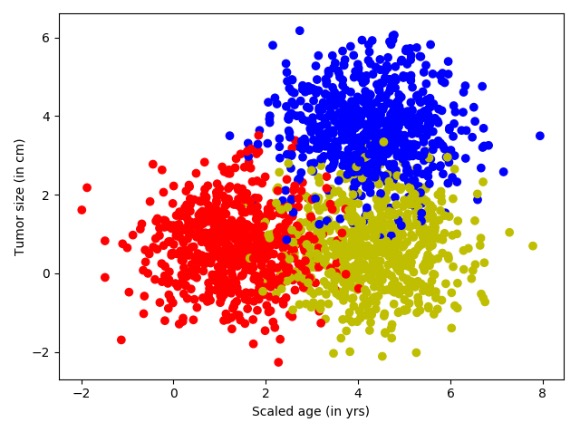
图7-3 三分类模拟数据集
在图7-3中,红色是原始的点,黄色点是在红色点的基础上将x+3.0后的变化,而蓝色的点是在红色点的基础上将x和y各加3.0。
2.构建网络结构
下面开始构建网络模型,这次使用了softmax分类,损失函数loss仍然使用交叉熵,对于错误率评估部分换成了取one_hot结果里面不相同的个数,优化器使用AdamOptimizer。
代码7-2 线性多分类(续)
lab_dim = num_classes
# tf Graph Input
input_features = tf.placeholder(tf.float32, [None, input_dim])
input_lables = tf.placeholder(tf.float32, [None, lab_dim])
# Set model weights
W = tf.Variable(tf.random_normal([input_dim, lab_dim]), name="weight")
b = tf.Variable(tf.zeros([lab_dim]), name="bias")
output = tf.matmul(input_features, W) + b
z = tf.nn.softmax(output)
a1 = tf.argmax(tf.nn.softmax(output), axis=1) # 按行找出最大索引,生成数组
b1 = tf.argmax(input_lables, axis=1)
err = tf.count_nonzero(a1 - b1) # 两个数组相减,不为0的就是错误个数
cross_entropy = tf.nn.softmax_cross_entropy_with_logits(labels=input_lables, logits=output)
loss = tf.reduce_mean(cross_entropy) # 对交叉熵取均值很有必要
optimizer = tf.train.AdamOptimizer(0.04) # 尽量用这个--收敛快,会动态调节梯度
train = optimizer.minimize(loss) # let the optimizer train
3.设置参数进行训练
本次同样设置数据集迭代50次,每次的minibatchSize取25条。
代码7-2 线性多分类(续)
# 启动session
with tf.Session() as sess:
sess.run(tf.global_variables_initializer())
for epoch in range(maxEpochs):
sumerr = 0
for i in range(np.int32(len(Y) / minibatchSize)):
x1 = X[i * minibatchSize:(i + 1) * minibatchSize, :]
y1 = Y[i * minibatchSize:(i + 1) * minibatchSize, :]
_, lossval, outputval, errval = sess.run([train, loss, output, err],
feed_dict={input_features: x1, input_lables: y1})
sumerr = sumerr + (errval / minibatchSize)
print("Epoch:", '%04d' % (epoch + 1), "cost=", "{:.9f}".format(lossval), "err=", sumerr / minibatchSize)
在迭代训练时对错误率的收集与前面的代码一致,每一次的计算都会将err错误值累加起来,数据集迭代完一次会将err的错误率进行一次平均,然后再输出平均值。运行上面的代码生成如下信息:
Epoch: 0001 cost= 0.408920079 err= 0.8544
Epoch: 0002 cost= 0.337683767 err= 0.3648
Epoch: 0003 cost= 0.321038276 err= 0.3328
Epoch: 0004 cost= 0.319500208 err= 0.32
……
Epoch: 0048 cost= 0.422929078 err= 0.2784
Epoch: 0049 cost= 0.423131853 err= 0.2784
Epoch: 0050 cost= 0.423317522 err= 0.2784
4.数据可视化
接下来一起看看对于三分类问题,线性可分是怎么分的。先取200个测试的点,在图像上显示出来,接着将模型中x1、x2的映射关系以一条直线的方式显示出来。因为输出端有3个节点,所以相当于是3条直线。
代码7-2 线性多分类(续)
train_X, train_Y = generate(200, num_classes, [[3.0], [3.0, 0]], False)
aa = [np.argmax(l) for l in train_Y]
colors = ['r' if l == 0 else 'b' if l == 1 else 'y' for l in aa[:]]
plt.scatter(train_X[:, 0], train_X[:, 1], c=colors)
x = np.linspace(-1, 8, 200)
y = -x * (sess.run(W)[0][0] / sess.run(W)[1][0]) - sess.run(b)[0] / sess.run(W)[1][0]
plt.plot(x, y, label='first line', lw=3)
y = -x * (sess.run(W)[0][1] / sess.run(W)[1][1]) - sess.run(b)[1] / sess.run(W)[1][1]
plt.plot(x, y, label='second line', lw=2)
y = -x * (sess.run(W)[0][2] / sess.run(W)[1][2]) - sess.run(b)[2] / sess.run(W)[1][2]
plt.plot(x, y, label='third line', lw=1)
plt.legend()
plt.show()
print(sess.run(W), sess.run(b))
运行上面的代码,输出如下,得到结果如图所示。
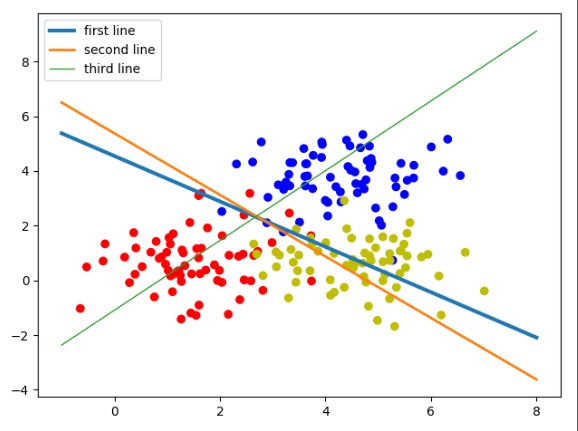
图为 三分类线性模型
[[-1.29152238 1.68322766 1.79681265]
[-0.55652267 2.47718096 -0.54918939]] [ 6.61509657 -8.44192219 -1.66505146]
图中,3个权重分别代表了3条线。还原成模型就是模型里3个输出的分类节点:
- 第1个输出节点代表分类0,红色,蓝线(first line)。
- 第2个输出节点代表分类1,蓝色,绿线(second line)。
- 第3个输出节点代表分类2,黄色,红线(third line)。
这3条直线的斜率和截距是由神经网络的学习参数转化而来的。在神经网络里,一个样本通过这3个公式会得到3个结果,这3个结果可以理解成3个类的特征值。其中哪个值最大,则表示该样本具有哪种类别的特征最强烈,即属于哪一类。可以在横轴随便找一个值,分别带到3条直线的公式里,哪条直线得出的y值最大,则说明该点属于哪一类。这3条线也没有把集合点分开,这是因为它们的分类规则是不一样的。下面回顾一下直线公式:
y=-x* (w1/w2)-(b/w2)
正常来讲:如果一个点在直线上,等式成立;如果点在直线的上方,那么左边的y值就大;如果点在直线的下方,那么右边的算式值就大。
但放到模型里对应的图像上并不是这样的,还取决于w1的正负取值,当w1为负时正好是相反的情况。从上例中的输出结果里可以看到,只有第一条线(蓝线)的w1是负数,所以蓝线是取其下面的点,红线和绿线是取其上方的点。举例:取一点红色的数据,如图所示。
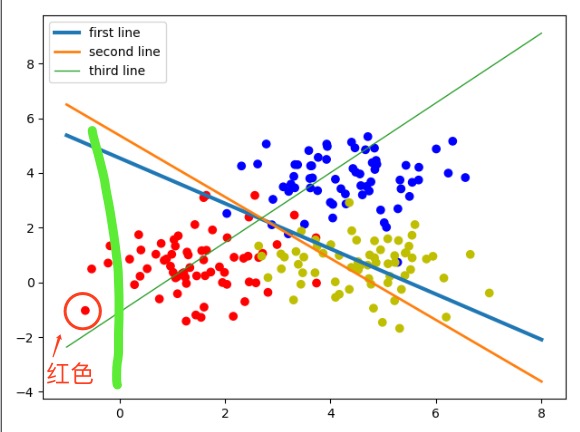
图 三分类线性模型分析
沿着y轴的方向平行画一条线经过该点,可以看到它在第一条线(蓝线)的下方,并且离蓝线的距离是最远的,所以它就属于第一条线对应的红色分类。说明对于这类的数据集,仍然可以使用线性可分的方法将其分开。本例也展示了线性可分在多分类问题上的应用与原理。
5.模型可视化
前面介绍了线性与模型的关系,现在把整个坐标系放到模型里,会得到一个更直观的模型分类可视化。为了方便演示,还是在图像上生成200个点并显示出来。然后按照坐标系的排列,把x1,x2放到模型里,见如下代码。
代码7-2 线性多分类(续)
train_X, train_Y = generate(200, num_classes, [[3.0], [3.0, 0]], False)
aa = [np.argmax(l) for l in train_Y]
colors = ['r' if l == 0 else 'b' if l == 1 else 'y' for l in aa[:]]
plt.scatter(train_X[:, 0], train_X[:, 1], c=colors)
nb_of_xs = 200
xs1 = np.linspace(-1, 8, num=nb_of_xs)
xs2 = np.linspace(-1, 8, num=nb_of_xs)
xx, yy = np.meshgrid(xs1, xs2) # 创建网格
# 初始化和填充 classification plane
classification_plane = np.zeros((nb_of_xs, nb_of_xs))
for i in range(nb_of_xs):
for j in range(nb_of_xs):
classification_plane[i, j] = sess.run(a1, feed_dict={input_features: [[xx[i, j], yy[i, j]]]})
# 创建 color map 用于显示
cmap = ListedColormap([
colorConverter.to_rgba('r', alpha=0.30),
colorConverter.to_rgba('b', alpha=0.30),
colorConverter.to_rgba('y', alpha=0.30)])
# 图示各个样本边界
plt.contourf(xx, yy, classification_plane, cmap=cmap)
plt.show()
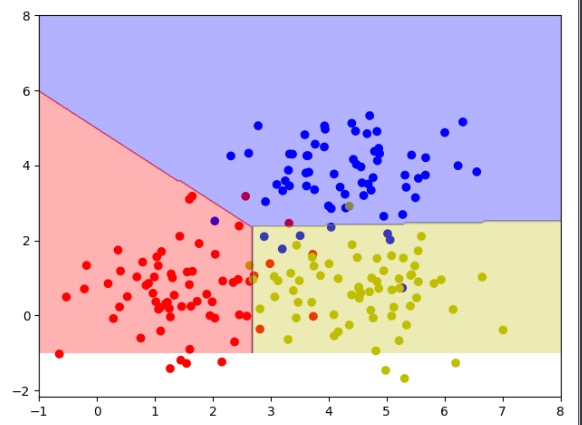
上面代码的运行结果如图7-6所示。将三分类模型用了不同的颜色区域进行区分,这样就是符合人眼规律的一个比较直观的可视化图样了。
图7-6 三分类模型可视化
认识非线性问题
在明白了线性问题之后,接着介绍非线性问题。非线性问题,就是用直线分不开的问题。为了解释这个概念,先来看一个数据集异或形态的数据,如图7-7所示。图7-7中只有4个点,蓝色为一类,红色一类,蓝色两个点的连线与红色两个点的连线会相交。对于这样的数据,你会发现无法使用一条直线将红色和蓝色两种类型的点分开,这就是非线性数据。
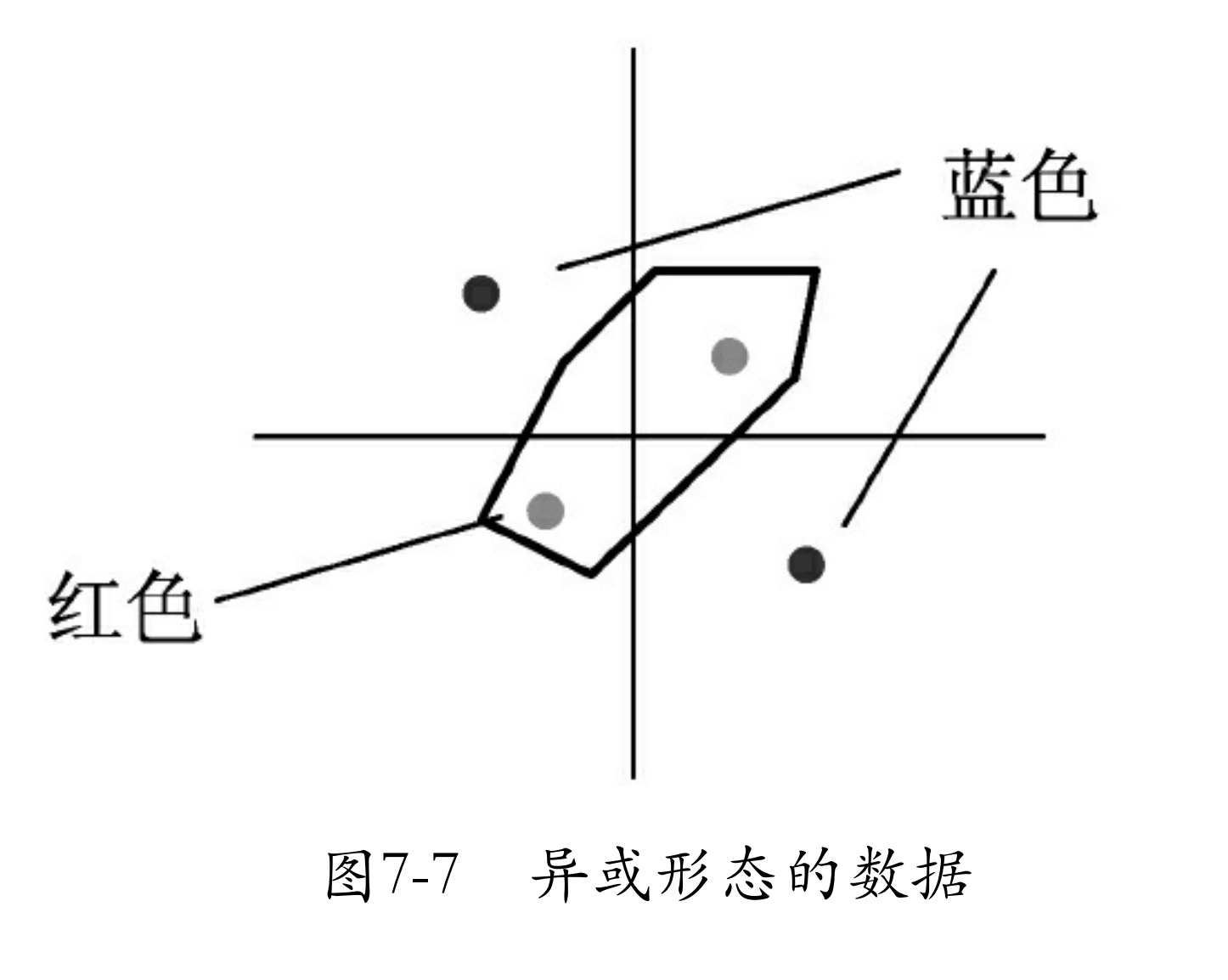
对于这样的数据,有一种笨方法,即对原始数据变形,使其变为线性分布。例如,将数据x1、x2进行一次绝对值运算,这时数据就会变为如图7-8所示的样子。
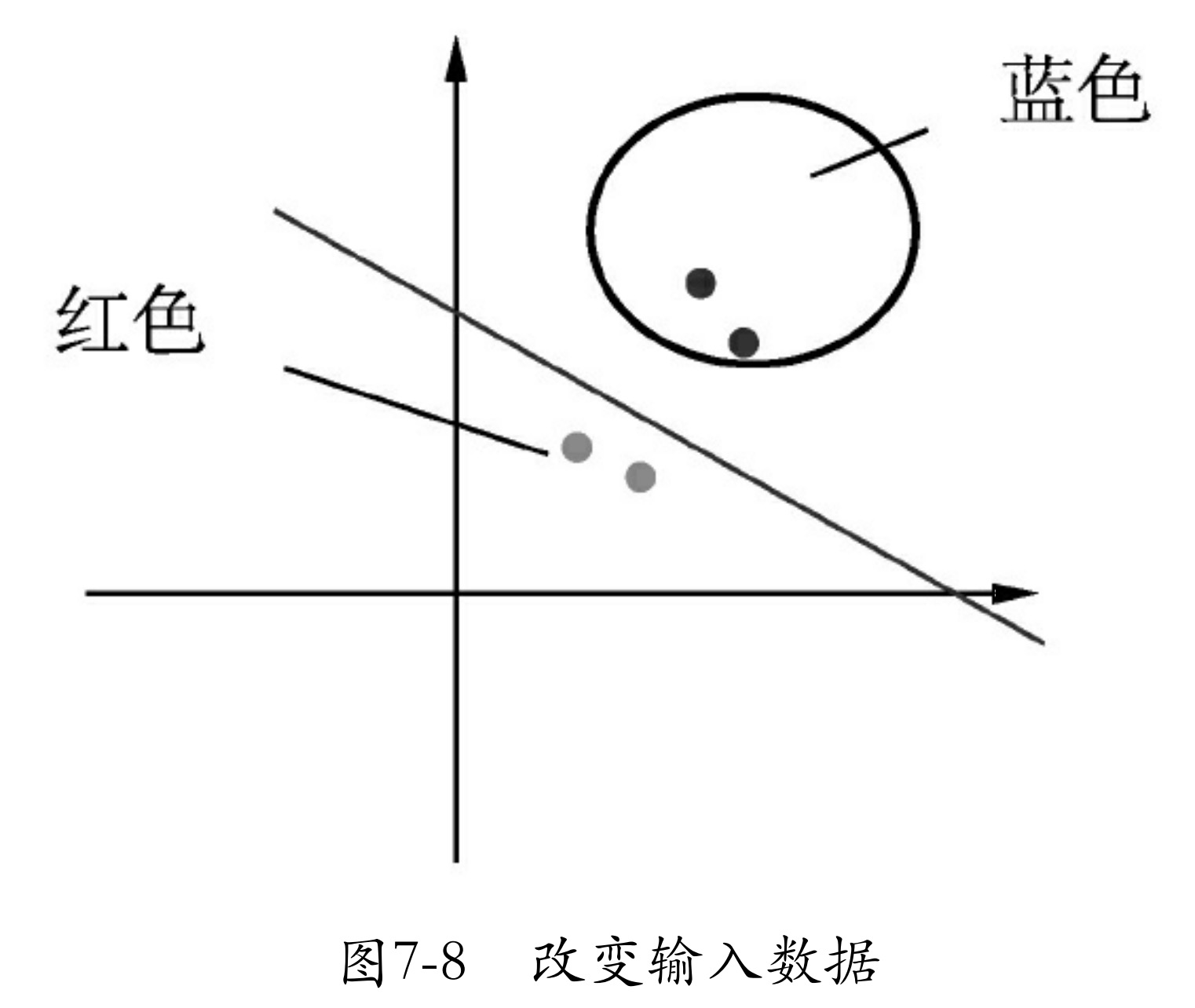
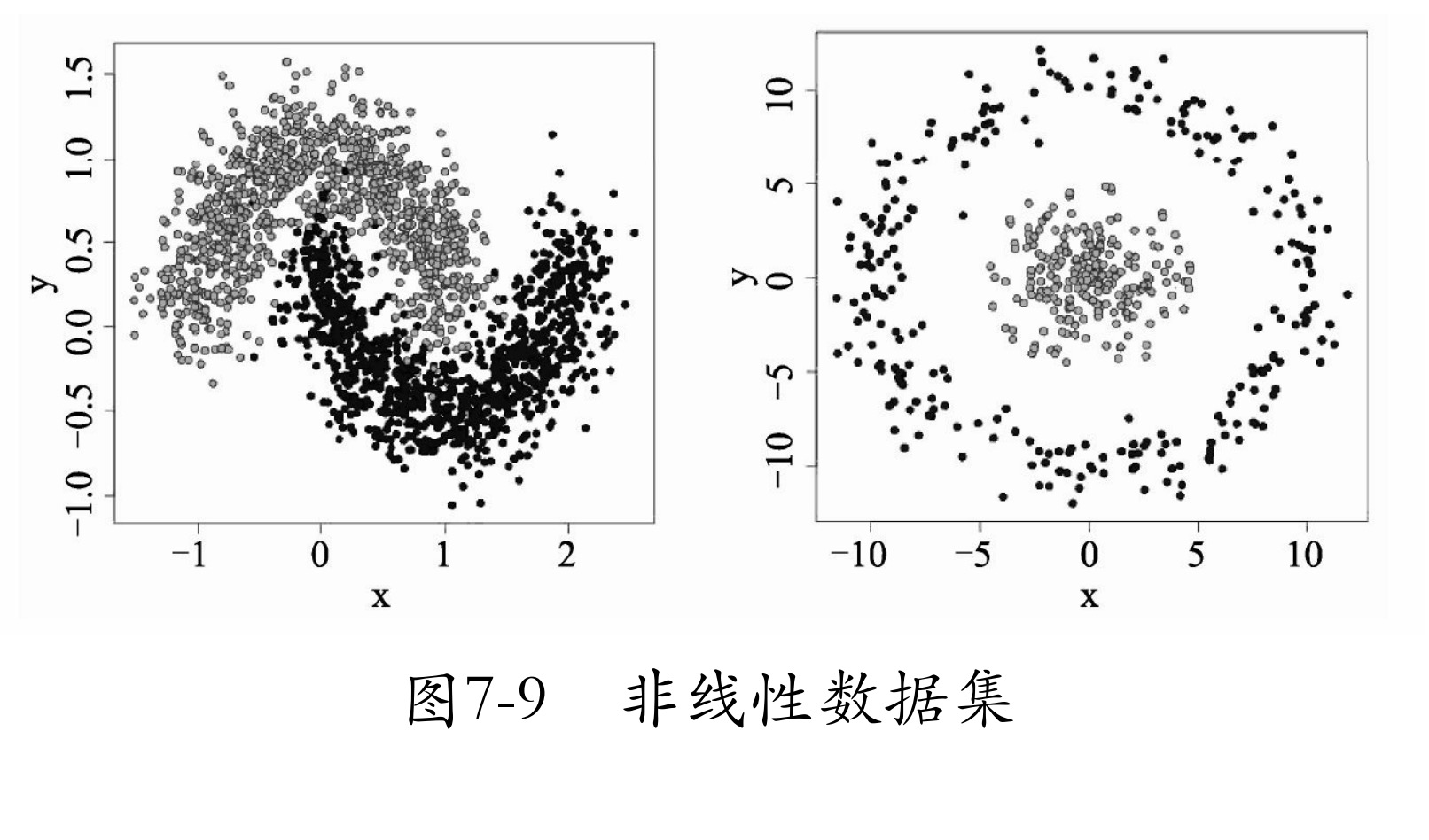
类似图7-8的方法有很多种,还可以将其进行一次平方运算。但这一切都是在人们肉眼看到模型分布后,通过分析得来的。而实际应用中会遇到更复杂的非线性数据集(如图7-9所示),或者有时数据维度太大,根本无法可视化。这时就需要用一种新方法 —— 多层神经网络 来解决问题了。